Quick Answer: NNTP pipelining reduces idle time between article requests, helping maintain steady throughput—especially on higher-latency connections or when using fewer connections.
What Is NNTP Pipelining?
NNTP pipelining is a performance feature that changes how a newsreader communicates with Usenet servers. Instead of waiting for a response after each request, the client sends multiple requests in sequence without pausing.
This reduces the stop-and-wait pattern that normally slows things down, especially over longer distances.
In a standard setup, each request must complete before the next one begins. With pipelining, multiple requests are queued and processed continuously, keeping the connection active and efficient.
How NNTP Pipelining Works
When a newsreader retrieves articles from Usenet, it sends commands to the server and waits for a response before continuing.
With pipelining enabled:
- Multiple article requests are sent back-to-back
- The server processes them in order
- Responses are returned as they are ready
- The connection stays active instead of pausing between requests
This approach minimizes idle time caused by round-trip delays between your system and the Usenet server.
The result is a smoother data flow, particularly when latency is higher.
Why Latency Matters
Latency is the time it takes for a request to travel from your system to the server and back.
Even small delays add up when thousands of article requests are involved. Without pipelining, each request introduces a pause. Over time, these pauses limit overall throughput.
Pipelining reduces that overhead by keeping requests in motion.
Where NNTP Pipelining Helps Most
NNTP pipelining does not affect every setup equally. Its impact depends on how your connection behaves.
You’ll see the biggest gains in these scenarios:
Higher-Latency Connections
Connections with longer round-trip times benefit the most. This includes cross-country or international routing, where delays between requests are more noticeable.

Lower Connection Counts
If your Usenet plan is limited to a lower number of connections, pipelining helps make better use of each one. Instead of relying on additional connections, it improves efficiency within the existing limit. It’s also worth noting that more connections don’t always translate to more bandwidth. Once your line is saturated, adding connections has little impact, but pipelining can still reduce idle time and improve consistency.
Remote or Hosted Systems
Systems running in hosted or cloud environments often have lower latency to Usenet servers than a typical home connection, which already helps performance. In these cases, pipelining may provide smaller gains, but it can still improve efficiency by reducing any remaining idle time between requests.
When Gains Start to Level Off
Pipelining improves efficiency, but it does not increase your maximum available bandwidth.
Once your connection is fully utilized, adding pipelining won’t push speeds higher. At that point, the limiting factor is bandwidth, not request timing.
This is why increasing connection counts alone doesn’t always lead to better performance. More connections can help, but only up to the point where your available bandwidth is saturated.
Real-World Performance Impact
Testing shows that pipelining can deliver noticeable improvements under the right conditions:
- Strong gains with a single connection
- Moderate gains with mid-range connection counts
- Smaller gains as connection counts increase
As connections scale upward, the benefit decreases because the system already has enough parallel activity to keep data flowing.
Measured Performance Data
The following results show average throughput with and without pipelining across different latency levels and connection counts:
| Latency | Connections | Avg Mbps (No Pipeline) | Avg Mbps (With Pipeline) | % Difference |
| 63 ms | 1 | 17.1 | 27.6 | 61.6% |
| 10 | 95.1 | 135.6 | 42.6% | |
| 25 | 178.8 | 227.4 | 27.2% | |
| 50 | 264.0 | 261.8 | -0.8% | |
| 100 | 262.6 | 267.4 | 1.8% | |
| 143 ms | 1 | 7.5 | 15.5 | 108.0% |
| 10 | 50.3 | 84.9 | 68.9% | |
| 25 | 90.5 | 118.2 | 30.6% | |
| 50 | 171.9 | 203.5 | 18.4% | |
| 100 | 271.3 | 275.2 | 1.4% |
These results reinforce a clear pattern:
- The highest gains occur at lower connection counts
- Higher latency amplifies the benefit of pipelining
- At higher connection counts (50–100), performance differences become minimal because available bandwidth is already being fully used
How to Enable NNTP Pipelining in SABnzbd
SABnzbd introduced support for NNTP pipelining in version 5.0. Enabling it takes just a few steps.
- Open Server Settings
– Access the SABnzbd Web interface
– Click Settings (the fear icon in the top right of the screen)
– Navigate to the Servers tab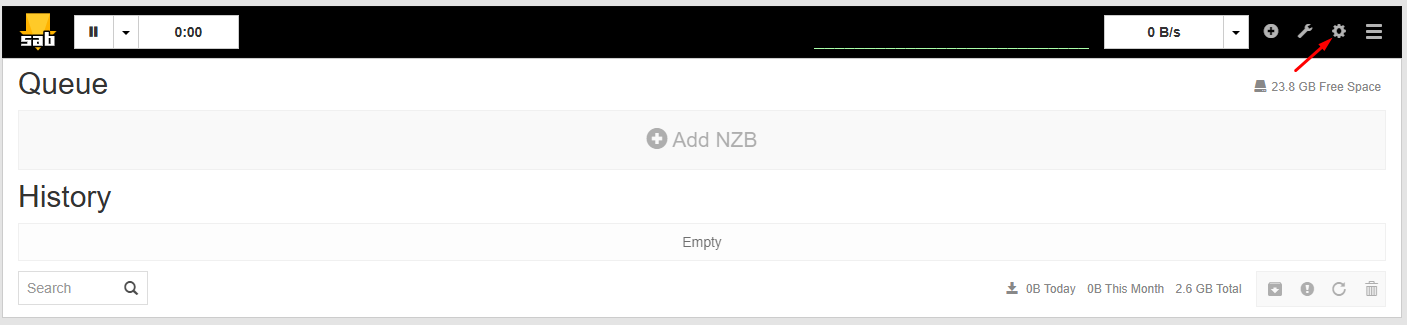
- Edit Your Server
– Find your configured Usenet server
– Click Show Details next to the server entry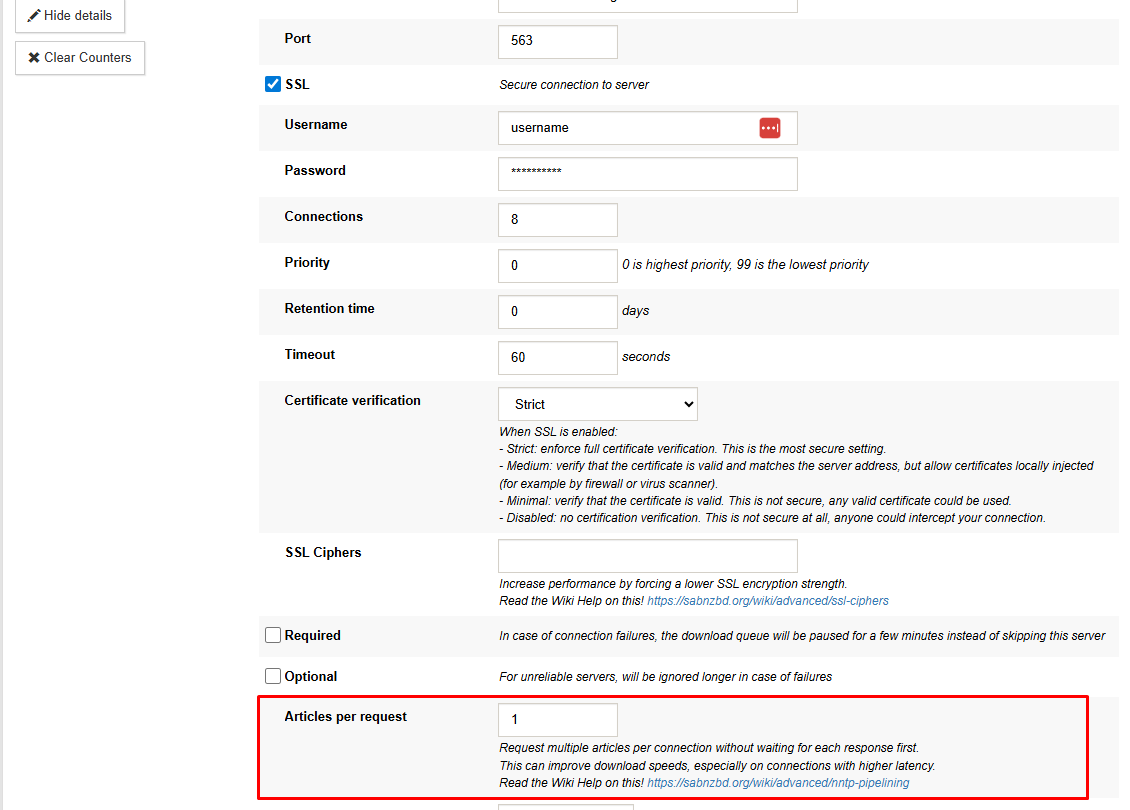
- Adjust Request Behavior
– Locate the Articles per request setting
– Enter a value to control how many articles are requested at once
– Save your changes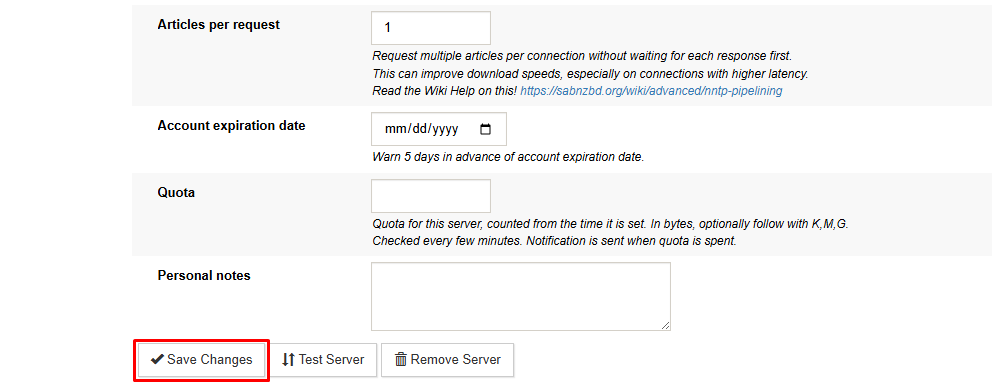
Start with a moderate value and adjust based on performance. Higher values increase request batching, but optimal settings depend on your system and connection.
Tuning Tips
- Test with different values to find the best balance
- Monitor performance rather than relying on fixed numbers
- Avoid extreme values that may reduce stability on some systems
The goal is to reduce idle time without overwhelming your setup.
When NNTP Pipelining Delivers Real Gains
NNTP pipelining can provide meaningful speed improvements in higher-latency scenarios or with lower connection counts, but benefits decrease once bandwidth is already fully utilized.
Why This Matters for UsenetServer Users
UsenetServer’s infrastructure is designed to maintain consistent performance across a wide range of conditions. Features like NNTP pipelining complement that by improving how efficiently your newsreader interacts with the network.
Instead of relying solely on higher connection counts, pipelining gives you another way to optimize performance—especially when latency is the limiting factor.